
Planning Pump Maintenance
Pump maintenance planning starts with equipment identification, the correct manual and a record of operating conditions. Organise inspection tasks, replacement components, service access and observations so that the maintenance work addresses the actual equipment and duty.
Related resources: Identify slurry pump replacement parts
The key decision
Use the model-specific manual for procedures and intervals. Record changes against a baseline, then plan the people, parts, access and isolation needed for the agreed work.
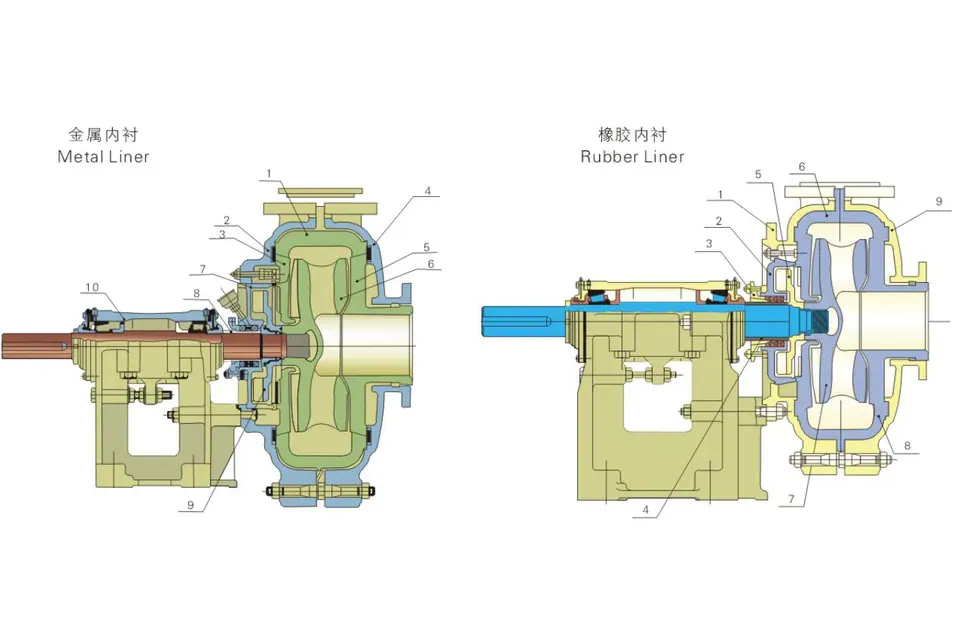
AM catalogue, page 18: metal-lined and rubber-lined pump construction.
1. Establish the equipment baseline.
Keep the model, serial or order reference, nameplate photograph, arrangement drawing and applicable manual together. Record the installed drive, sealing arrangement and known material or configuration changes. A manual for a similar-looking pump may not describe the installed assembly.
- Operating duty and medium, including relevant temperature or solids data.
- Commissioning or previous service records, where available.
- Component references and previous replacements.
- Document revisions and the person responsible for the equipment record.
Use the manufacturer’s instructions and the site maintenance system to establish tasks and intervals. This guide provides a planning structure; it does not prescribe a universal lubrication interval, clearance or overhaul schedule.
2. Record observations so they can be compared.
A single reading has limited meaning without its operating context. Retain the date, operating state, measurement location, units and instrument reference where relevant. Compare like-for-like conditions when looking for a change.
| Observation | Context to retain |
|---|---|
| Pressure or flow change | Operating demand, valve state and liquid level. |
| Noise or vibration observation | When it occurs, operating state and available measured data. |
| Leakage | Location, operating state and whether the observation is new. |
| Wear or damage | Component identity, photographs and service history. |
Keep the observed symptom separate from a suspected cause. Use measurements already available through approved site procedures; inspection and maintenance should follow the equipment manual and site isolation arrangements.
3. Prepare the work package.
Connect the task to the manual section or approved work instruction. Identify the parts, tools, lifting access and people required. Confirm how the equipment is made safe, who carries out the work and who authorises its return to service under site procedures.
For a parts order, include component references, material, quantity and required date. Record compatibility, availability and delivery as separate confirmation items. Do not assume that a visually similar spare is suitable.
Use maintenance and spare-parts support for identification questions or after-sales support to organise an operating problem record.
4. Close the work with an updated record.
Record what was inspected or replaced, the component references used, relevant findings and the document revision followed. Retain photographs where they help identify the condition or component.
After the authorised return-to-service checks, record the operating condition for future comparison. If the same symptom returns, link the new observation to the earlier work rather than creating an isolated fault description.
Frequently asked questions
How often should a pump be serviced?
Use the applicable manufacturer instructions and the site maintenance plan. Equipment configuration, medium, duty and condition history affect the plan.
Can wear photos identify a replacement part?
They help explain the condition. Add the nameplate, component or drawing reference and material information to establish the requested replacement.
What should remain after maintenance?
Retain the work record, findings, replaced-part references, relevant photographs and the authorised return-to-service record.
Sources and further reading
General references used for this guide. Review the applicable model data and project requirements for your own duty.